For the complete documentation index, see llms.txt. Markdown versions of all docs pages are available by appending .md to any docs URL.
Claude Code
Configure Claude Code CLI to use agentgateway
Configure Claude Code, the AI coding CLI by Anthropic, to route LLM requests through your agentgateway proxy.
The primary use case is routing Claude Code to non-Anthropic LLM backends (such as vLLM, Ollama, or any OpenAI-compatible provider) for cost optimization and flexibility. You can also configure direct routing to Anthropic or use a Claude Teams account as alternative options.
Before you begin
- Install the
agentgatewaybinary. - Install the Claude Code CLI (
npm install -g @anthropic-ai/claude-code).
Tip
If you manage models and virtual API keys in the standalone UI, Client Setup can generate the connection settings or snippet for this client. Review the gateway URL, select a model and key, choose the client from the Integration dropdown, and copy the recipe. Each recipe uses only the values that its client supports.
Client Setup generates client-side values from existing configuration. It does not create a route, model, authentication policy, virtual key, or provider credential. Follow the steps in this guide to configure those prerequisites or to set up the client manually.
Note
The CLAUDE_CODE_DISABLE_EXPERIMENTAL_BETAS environment variable disables Claude Code’s experimental beta features. You typically do not need this variable when proxying to non-Anthropic backends or standard Anthropic routing.
Only set this variable if you encounter errors like Extra inputs are not permitted when using advanced Anthropic features (such as experimental translation or extended thinking). If you use a non-Anthropic backend, this variable can be safely omitted.
Configure agentgateway with OpenAI-compatible backend
Route Claude Code to any OpenAI-compatible LLM provider (such as vLLM, Ollama, or local language models). This is the recommended approach for cost-effective and flexible deployment.
Set up agentgateway
You can configure agentgateway in the UI or in your configuration file.
To create the same configuration in the UI, follow these steps.
Create a configuration file with an empty
llmsection, and start agentgateway.cat > config.yaml <<'EOF' llm: models: [] EOF agentgateway -f config.yamlOpen LLM > Models, such as http://localhost:15000/ui/llm/models, and click Add model.
From the Provider dropdown, select OpenAI.
In the Incoming model match field, replace the default
openai/*with*.For the Provider API key, select API key, and enter
mock-key.For the Outgoing model, select Explicit. In the Explicit outgoing model field, enter
Qwen/Qwen3-32B. Replace the model with the model that your backend serves.The form has no field for
params.baseUrl. Click the Raw icon (<>) in the drawer header, and addbaseUrl: "http://localhost:8000/v1"underparams. Replace the URL with your OpenAI-compatible provider’s endpoint.Click Save model.
The UI writes the provider as openai instead of openAI. Agentgateway accepts both values. If you prefer a form field for the base URL, select the Custom provider instead. That provider has a Base URL field, and writes a custom provider block instead of openAI.
Whether the UI can save depends on your storage mode. For more information, see Save changes from the UI.
Connect Claude Code
Configure Claude Code to point to your agentgateway instance.
export ANTHROPIC_BASE_URL="http://localhost:4000"Verify the connection.
claude -p "Hello"
Configure agentgateway with Anthropic backend
Alternatively, route Claude Code directly to Anthropic’s API through agentgateway. This is useful if you want to leverage Anthropic’s latest models or features directly.
Get an Anthropic API key
Get an Anthropic API key from the Anthropic Console.
Export your Anthropic API key.
export ANTHROPIC_API_KEY="sk-ant-your-key-here"
Set up agentgateway
You can configure agentgateway in the UI or in your configuration file.
To create the same configuration in the UI, follow these steps in the terminal where you exported the key.
Create a configuration file with an empty
llmsection, and start agentgateway. The UI checks that theANTHROPIC_API_KEYenvironment variable exists when you save the model.cat > config.yaml <<'EOF' llm: models: [] EOF agentgateway -f config.yamlOpen LLM > Models, such as http://localhost:15000/ui/llm/models, and click Add model.
From the Provider dropdown, select Anthropic.
In the Incoming model match field, replace the default
anthropic/*with*.For the Provider API key, select Env var, and enter
ANTHROPIC_API_KEY.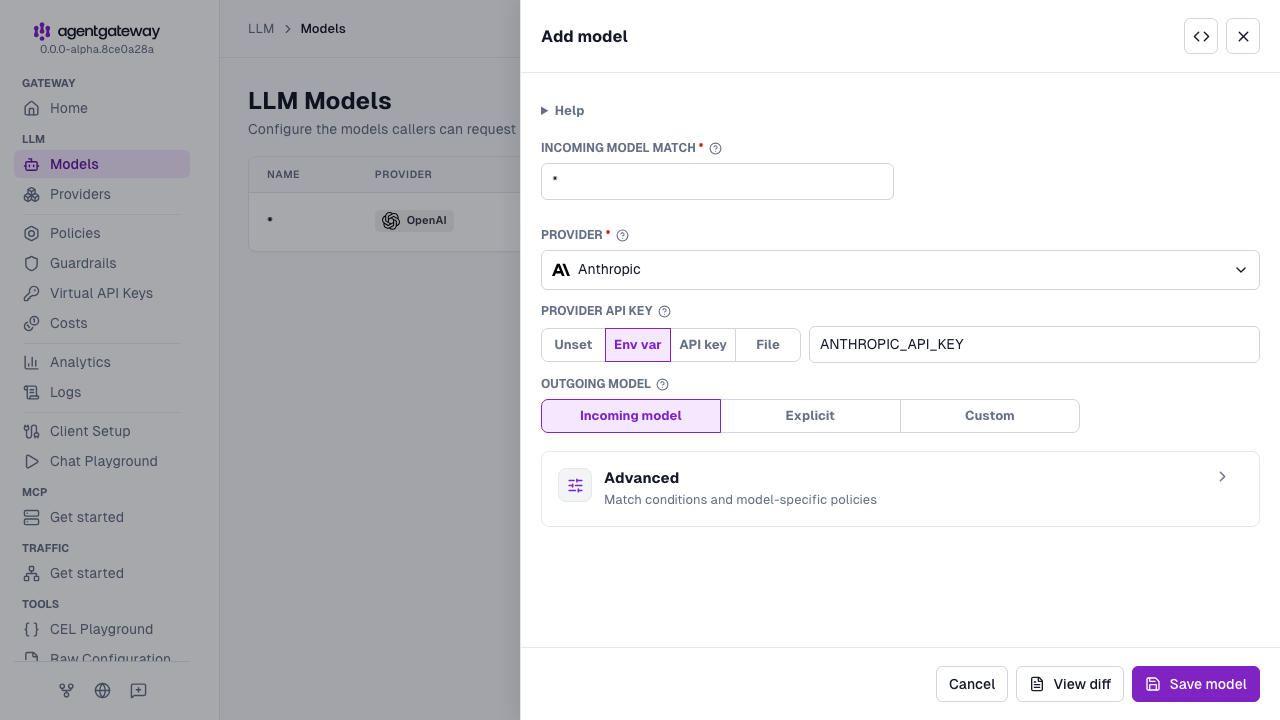
Click Save model.
Whether the UI can save depends on your storage mode. For more information, see Save changes from the UI.
Connect Claude Code
Configure Claude Code.
export ANTHROPIC_BASE_URL="http://localhost:4000"Verify the connection.
claude -p "Hello"Example output:
Hello! How can I help you today?If you see an error like
API Error: 400 context_management: Extra inputs are not permitted, Claude Code is sending experimental beta parameters that agentgateway does not yet support. Disable experimental betas and retry the request.export CLAUDE_CODE_DISABLE_EXPERIMENTAL_BETAS=1 claude -p "Hello"
Note
For pinned model configuration, extended thinking, and other options, see the Anthropic provider page.
Claude Teams or Pro account
If you have a Claude Teams or Pro account, you can use agentgateway for request routing without an API key. Authentication is handled by your Claude subscription via OAuth.
Create a configuration file. Agentgateway listens on port
4001and routes requests to Anthropic.cat > config.yaml << 'EOF' gateways: default: port: 4001 protocol: HTTP llm: models: - name: '*' provider: anthropic EOFStart agentgateway.
agentgateway -f config.yamlSet the
ANTHROPIC_BASE_URLenvironment variable to point Claude Code at the gateway.export ANTHROPIC_BASE_URL="http://localhost:4001/"Verify the connection.
claude -p "Hello"